Bonsai bench

A care calendar for 36 trees, each on its own clock

  • Product design
  • Data modeling
  • Prototyping
  • 2026
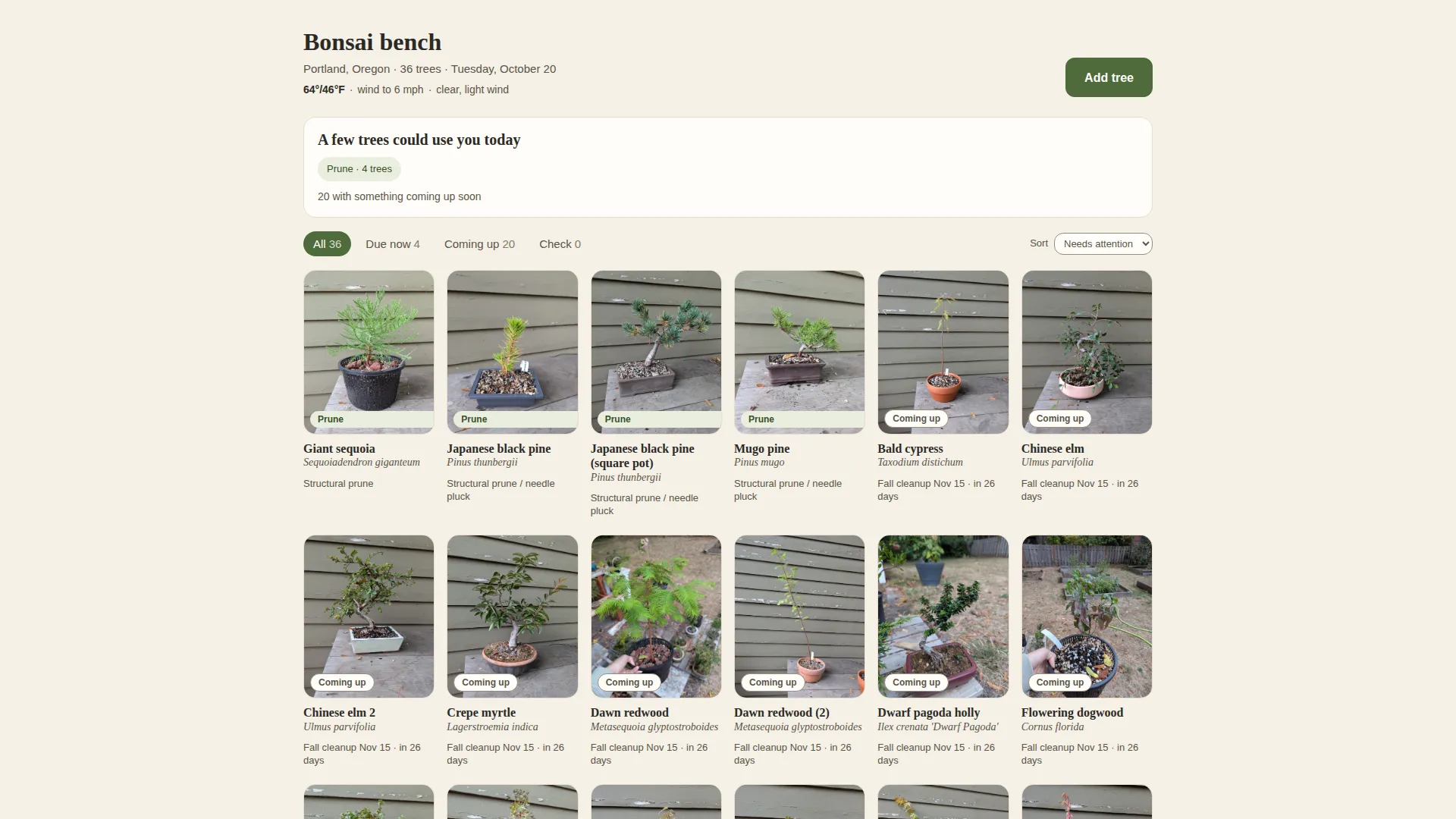
The Bonsai bench home screen on a warm off-white background: the collection count, the date and today’s Portland weather, a card saying a few trees could use you today with four to prune, filters for all, due now, coming up and check, and a grid of tree photos on a grey bench, each labelled with its species and the next task.

I built a personal app to manage my bonsai collection, track species-specific care, and surface what needs attention today.

Team
Solo, Claude Code
Timeline
2026
Outcome
A daily care workflow tailored to 36 trees, their seasonal needs, and Portland’s climate.

Why I built it

Thirty-six trees meant thirty-six sets of care requirements, each on its own schedule. Memory and generic plant-care reminders couldn’t keep up.

I wanted one place that understood my actual collection and told me what needed attention now, what was coming up, and what could wait.

The Bonsai bench home screen: the collection count, the date and today’s Portland weather, a card saying a few trees could use you today with four to prune, filters for all, due now, coming up and check, and a grid of 36 tree photos on a grey bench, each labelled with its species and the next task.
The whole collection, sorted by what needs attention first.

Each tree on its own clock

Every tree has its own profile, care notes, history, and seasonal timeline. Species-specific windows help determine when to repot, fertilize, prune, and wire.

The home screen turns that information into a daily plan, sorting trees by urgency rather than making me work through the collection myself.

Schedules provide guidance, not absolute rules. Weather, tree health, and development stage still matter.

The detail view for a Japanese black pine in a square pot: its photo, today’s task of a structural prune and needle pluck with a Mark as pruned button, the current wiring window, a care sheet covering light, water, soil and winter in Portland, notes, and a season timeline with bars for repotting, fertilizing, fall feed, pruning, wiring and freeze protection across the year.
One tree’s page: today’s task, the care sheet, and the year laid out as windows rather than reminders.

Designed for daily use

The app makes routine care easy to track. I can mark tasks complete, keep a running log, check the forecast, and add trees with a photo and a few details.

Photo-assisted entry reduces setup effort. New trees need a validated species identification and care profile before the app can generate a useful schedule.

The Add a tree form over the home screen: fields for name, species, species name, acquisition date, pot and a photo, with a note that trees without a care profile have no schedule until one is added.
Adding a tree: a photo and a few fields, and the care profile follows.

What I learned

The hardest part wasn’t the interface. It was modeling the differences between trees and turning those differences into useful, time-sensitive guidance.

I used AI to accelerate development and photo-based entry, with a lightweight architecture and a scheduled job to keep weather data available.

The bigger lesson: useful tools don’t just organize information. They make the next decision easier.

The home screen filtered to Due now: four trees that want a structural prune today, a giant sequoia, two Japanese black pines and a mugo pine, each with its photo and the task beneath.
Due now: the four trees that want something today, and nothing else.